Use your agent to generate Seedance 2.5 videos on Starchild
TL;DR: Your Starchild agent can generate Seedance 2.5 videos in chat. Connect the brand files you already keep in Drive, Docs, or Notion, save preferred settings as skills, and direct multi-second clips in natural language from any device.
Most video tools still make you bounce between a prompt box, an upload form, a queue, and a download page. That works for a one-off clip. It breaks down when video has to match a brand system you already run: logos in Drive, messaging in Docs or Notion, preferred shot length and resolution, and the same look every time you ask for a cut.
What Seedance 2.5 unlocks
Seedance 2.5 (ByteDance) is available through Starchild's video skill. In practice, that means your agent can drive generation with the same memory, files, and skills it already uses for everything else.
What you can ask for:
- Clips up to 30 seconds (or
autolength) - 480p or 720p output
- Image-to-video from a locked still
- Multi-reference control when you need consistent subjects or style
- Native audio, including timed voice lines when the shot needs them
- Seamless start/end frame locks for loops (same image as start and end)
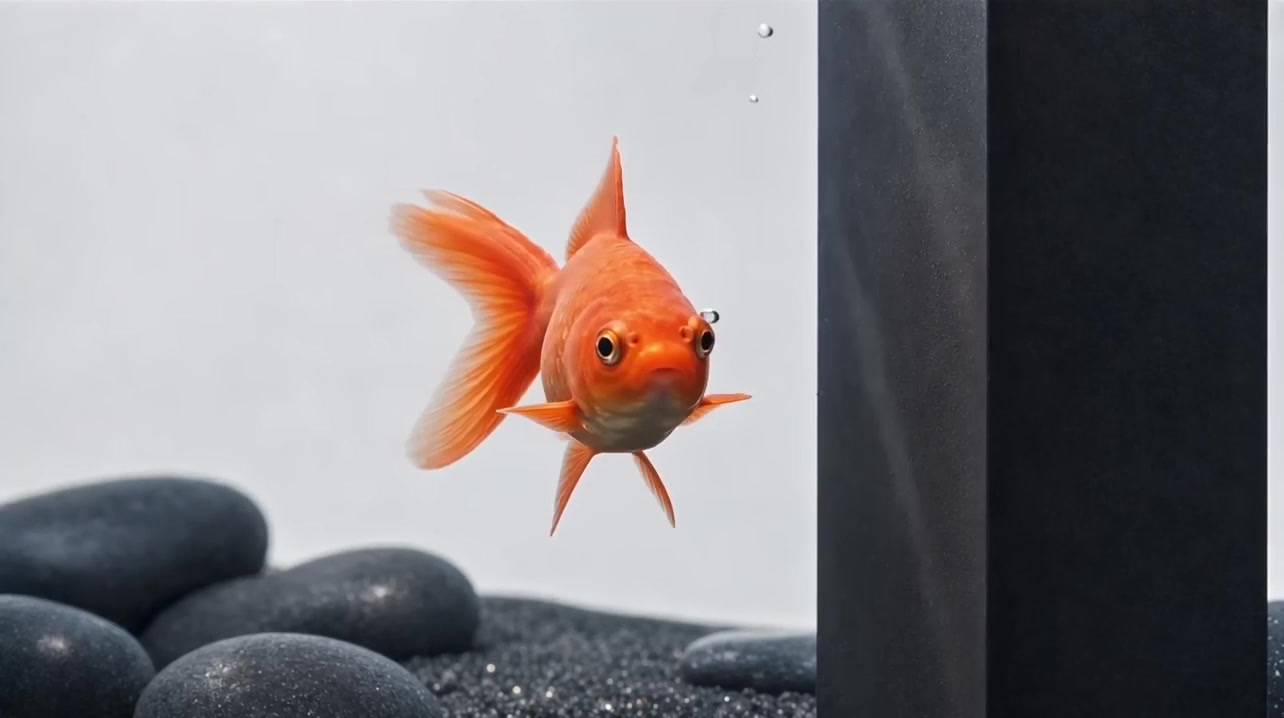
The goldfish clip above is a one-shot Seedance 2.5 image-to-video example: a macro still of an orange fish around a dark tank subject, directed motion, and a short spoken line baked into the generation.
5s cut from a Seedance 2.5 image-to-video render on Starchild.
How the agent workflow works
You stay in chat. The agent handles model choice, duration, resolution, references, and file delivery. The important part is what sits around the model call.
1. Pull brand assets from where they already live
You do not have to rebuild a media library inside a video UI. Connect Google Drive, Google Docs, Notion, or other linked apps, then ask the agent to use the logo pack, product still, or brief that already exists there.
Examples that work in plain language:
- "Use the orange wordmark from our brand Drive folder."
- "Pull the hero still from last week's product doc."
- "Match the tone in the Notion launch brief, then generate a 5s Seedance clip."
The agent can read those sources, pick the right file, and feed it into image-to-video or multi-reference generation. Your source of truth stays in Drive or Docs. The video step consumes it.
2. Keep a brand registry the agent can reuse
For teams that generate often, put logos, colors, approved stills, fonts, and do/don't notes in a brand registry the agent can read every time. On Starchild that can be a brand/ folder, a connected Drive pack, or both.
Once that registry exists, you stop re-uploading the same assets into a form. You say "use brand colors and the primary logo," and the agent already knows where those files sit, which variants are approved, and what not to invent.
3. Save preferred settings as workflow skills
Raw UX forces you to re-enter duration, resolution, model, loop rules, and caption style on every run. On Starchild you can turn a repeatable process into a skill:
- Default to Seedance 2.5, 5s, 720p, no hashtags on social cuts
- Always lock start and end frame for seamless loops
- Always pull the latest product still from Drive before rendering
- Always return the file path and a one-line usage note
After that, the instruction shrinks to something like "make the usual product loop from today's still." The skill holds the process. You only change what is new.
4. Direct it in natural language, from any device
Web, Telegram, WeChat, or wherever you already talk to the agent: same memory, same files, same skills. You can start a brief on desktop, approve a still from your phone, and ask for the final cut later without rebuilding the job in a separate video dashboard.
Typical run
- Point at the brief or brand source ("Drive brand pack," "Notion launch doc," or a local still).
- State the outcome in plain language: length, resolution, loop, VO, platform.
- Let the agent resolve assets, apply skill defaults, and generate.
- Review the file, then iterate with a tighter note ("slower move," "hold logo longer," "swap end frame").
Starchild keeps the prompt, source stills, brand references, outputs, and follow-up edits in one place, so the next cut starts from what already worked.
Video models you can use
Seedance 2.5 is the long-clip / multi-ref option. Starchild also routes other fal.ai video models when you want cheaper iteration, faster drafts, or higher resolution.
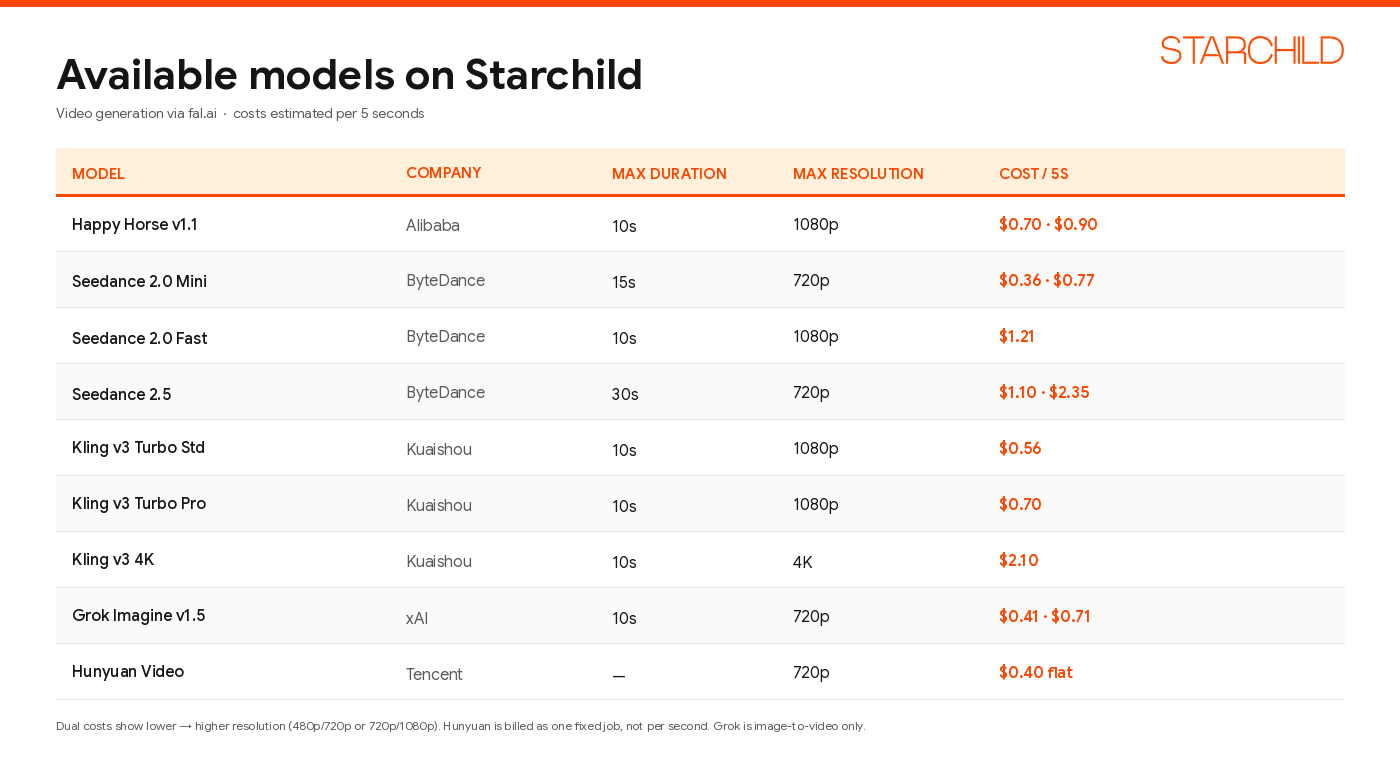
Estimated cost per 5 seconds via the Starchild video skill. Dual prices are lower → higher resolution. Hunyuan is billed as a flat job.
Quick picks:
- Cheap iteration: Seedance 2.0 Mini at 480p
- Long clips, loops, multi-ref, native audio: Seedance 2.5
- Highest resolution: Kling v3 4K
Try it
Open your agent and ask for a Seedance 2.5 clip. Start from a still you already like, keep the first version short, and tighten from there.