Meet the Starchild Desktop App: Bridging Your Mac to Cloud AI Agents
Your agent is always on in the cloud. The Starchild app connects it to your Mac.
Your agent is always on in the cloud. The Starchild app connects it to your Mac, so it can access your files and run things locally, with permissions you control.
Most work still happens locally: spreadsheets sitting in your Downloads folder, code repositories on your drive, and PDFs waiting on your Desktop. If you have been looking for an autonomous AI agent for Mac that can safely interact with those local files while keeping the power of an always-on cloud engine, running local-only tools usually meant compromises.
Today, we are bridging that gap. The Starchild desktop app for macOS connects your physical Mac directly to your 24/7 cloud AI agent.
The Best of Both Worlds: Always-On Cloud, Hands-On Local
Before this release, running an AI desktop assistant locally meant that closing your laptop lid stopped your agent cold. If your Mac went to sleep, your automated schedules, monitoring routines, and long-running workflows stopped with it.
With Starchild, your agent runs 24/7 in the cloud. It keeps monitoring feeds, executing scheduled jobs, and helping you across sessions without relying on your laptop staying awake or draining your battery.
The desktop app simply opens a secure, private bridge between your cloud agent and your machine whenever you want to collaborate on local files.
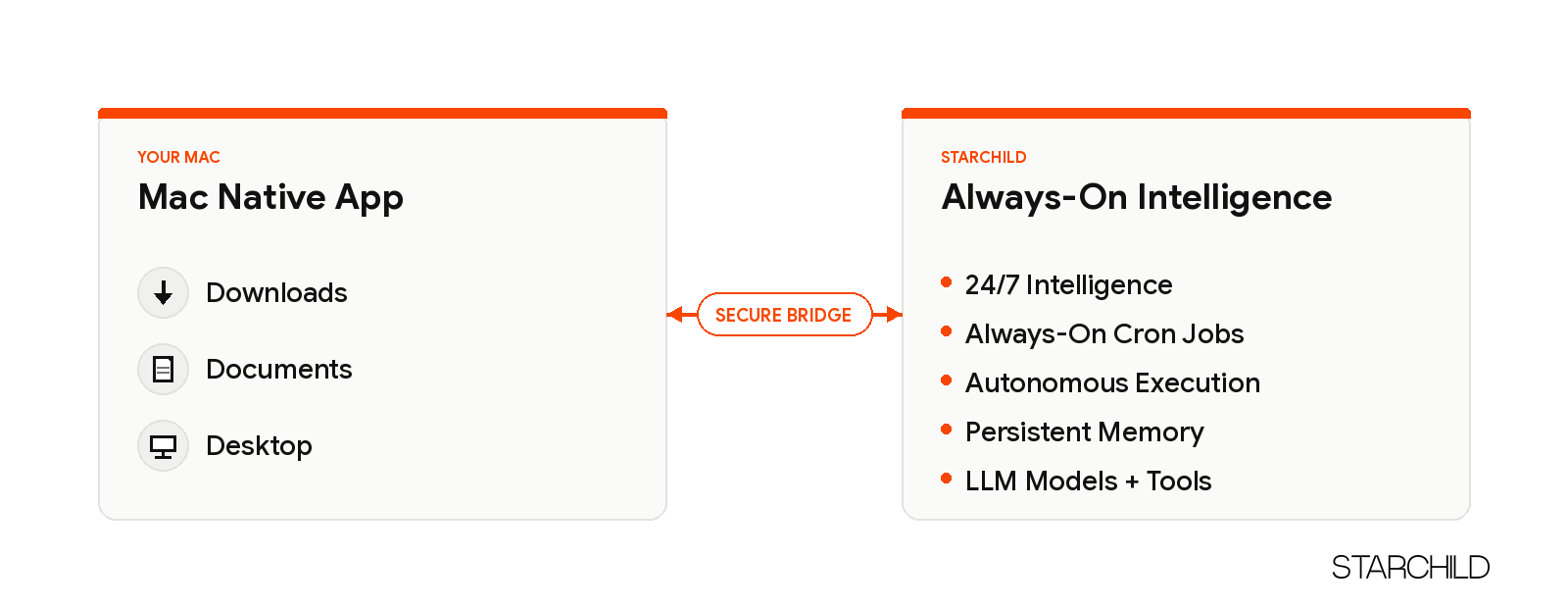
When connected, your agent can:
- Read project files, spreadsheets, or raw datasets directly from designated local directories.
- Write generated assets, code drafts, and research deliverables directly to your machine.
- Run allowlisted terminal commands such as
node,npm, orlslocally to inspect build output.
Your Files, Your Rules: Permission-Scoped Security
Granting an AI agent access to your personal computer should never require handing over unrestricted control. The desktop bridge is built with strict boundary enforcement from day one:
- Explicit folder allowlists: You choose exactly which directories your agent can access, such as
~/Downloads,~/Documents, or~/Desktop. - Revocable anytime: You can modify folder permissions or sever the pairing instantly from the desktop menu.
- Sensitive data remains off-limits: The bridge strictly blocks access to SSH keys (
~/.ssh), shell configurations (~/.zshrc,~/.bashrc), browser profiles, and hidden system credentials. - Safe execution policies: Destructive shell commands (such as recursive deletes or privilege escalation) are rejected by default.
Getting Started in Four Steps
Setting up takes less than two minutes:
- Download the build: Grab the macOS installer directly from iamstarchild.com/download.
- Install the application: Open the DMG file and drag Starchild into your Applications folder.
- Pair your agent: Launch the app, ask your cloud agent for a pairing key, and paste it into the prompt.
- Grant local folders: Pick the directories your agent is permitted to read and write.
If you prefer package managers, install via Homebrew:
brew tap starchild/tap https://github.com/Starchild-ai-agent/homebrew-tap
brew trust starchild/tap
brew install --cask starchild-app-release
A companion CLI binary is also available for lightweight terminal pairing:
curl -fsSL https://workroom.iamstarchild.com/install/cli | bash
starchild login <pairing-key>
The First Step in the Starchild Device Ecosystem
The macOS release is just the beginning of our multi-surface vision. Work happens across all devices, and agents should be available wherever you operate.
Dedicated native applications for iOS and Android are already in development, bringing your autonomous agents, notifications, and approvals into your pocket.
Help Shape the Future: Try It and Tell Us What You Think
We built this desktop application for people who build, research, and execute real work every day. Because this is a fresh release, real-world feedback is essential.
We invite you to take the desktop app for a spin:
- Download the macOS release at iamstarchild.com/download.
- Connect it to your agent and test your real-world workflows: code audits, local document analysis, or report exports.
- Tell us what works smoothly, what feels clunky, and where you encounter interesting edge cases.
Share your thoughts in the Starchild community or reach out directly to the team. Your feedback guides the next set of updates.